

01
Runs behind your firewall
A standalone desktop application on one PC, or a central firm database shared across your network server. Confidential client files stay protected.
Praszo Verifi
Catch last-minute financial statement errors in seconds. Keep complete audit control.
The problem
The last-mile risk in exported drafts. Once statements leave the spreadsheet for PDF or Word, live links break and last-minute edits slip in unseen
Interface
A first look at the application. Scroll to explore, and see everything in a live demo.
There is more to Praszo Verifi than these screens
See the full application in a live demo.
Book a demo01
A standalone desktop application on one PC, or a central firm database shared across your network server. Confidential client files stay protected.
02
Text-based or scanned PDF and Word documents, with sideways tables rotated automatically and Western (1,234,567) or South Asian (12,34,567) number formats.
03
Annual, half-yearly, and quarterly interim engagements for private, listed, or group entities, with deviation tolerances you set.
04
Verifi flags potential errors. Your reviewers apply tick-marks, leave comments, and log formal approval overrides.
The 4 core diagnostic engines
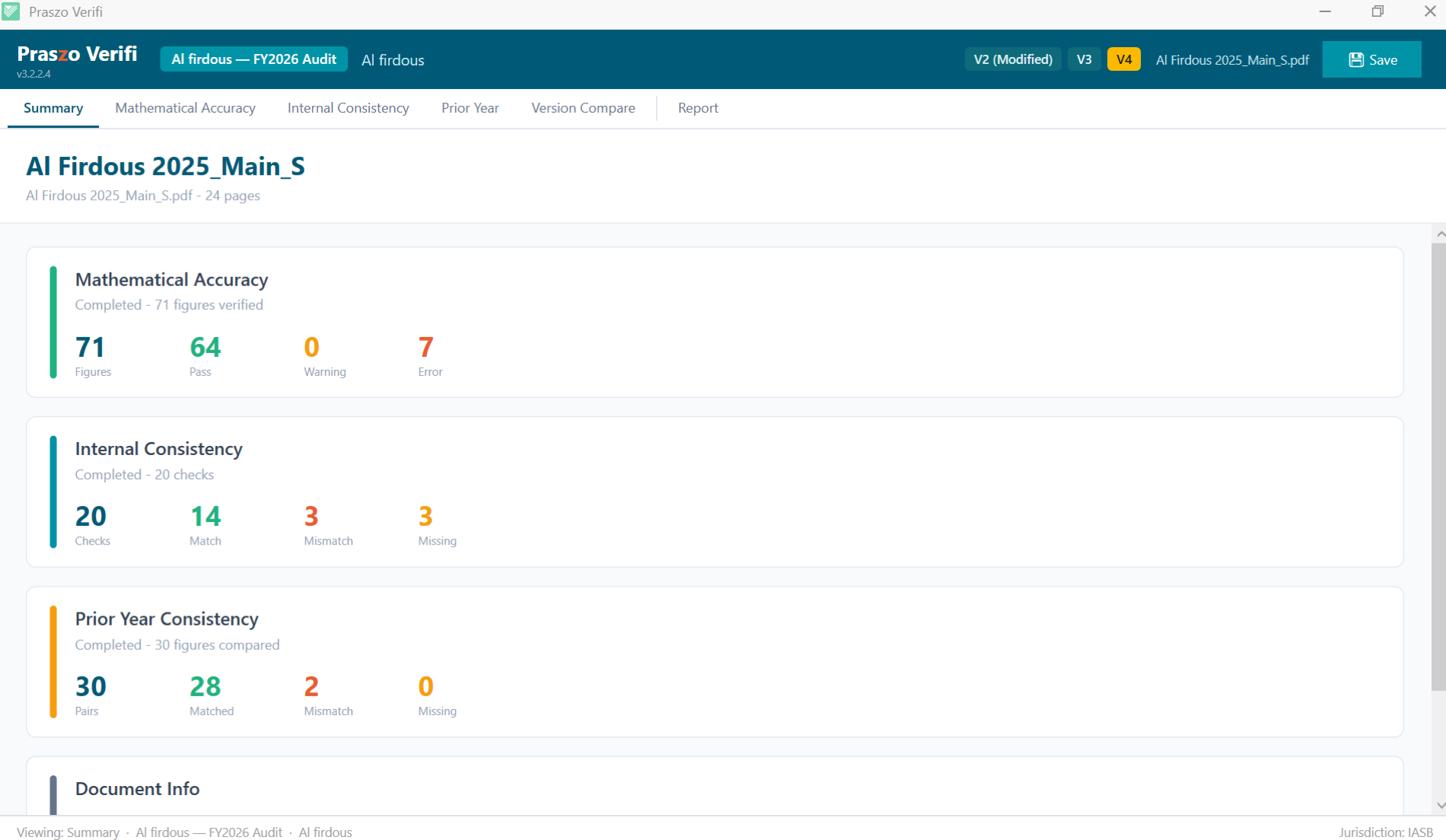
Verifi runs four verification checks across your whole draft to catch errors before they reach boards, clients, or regulators.
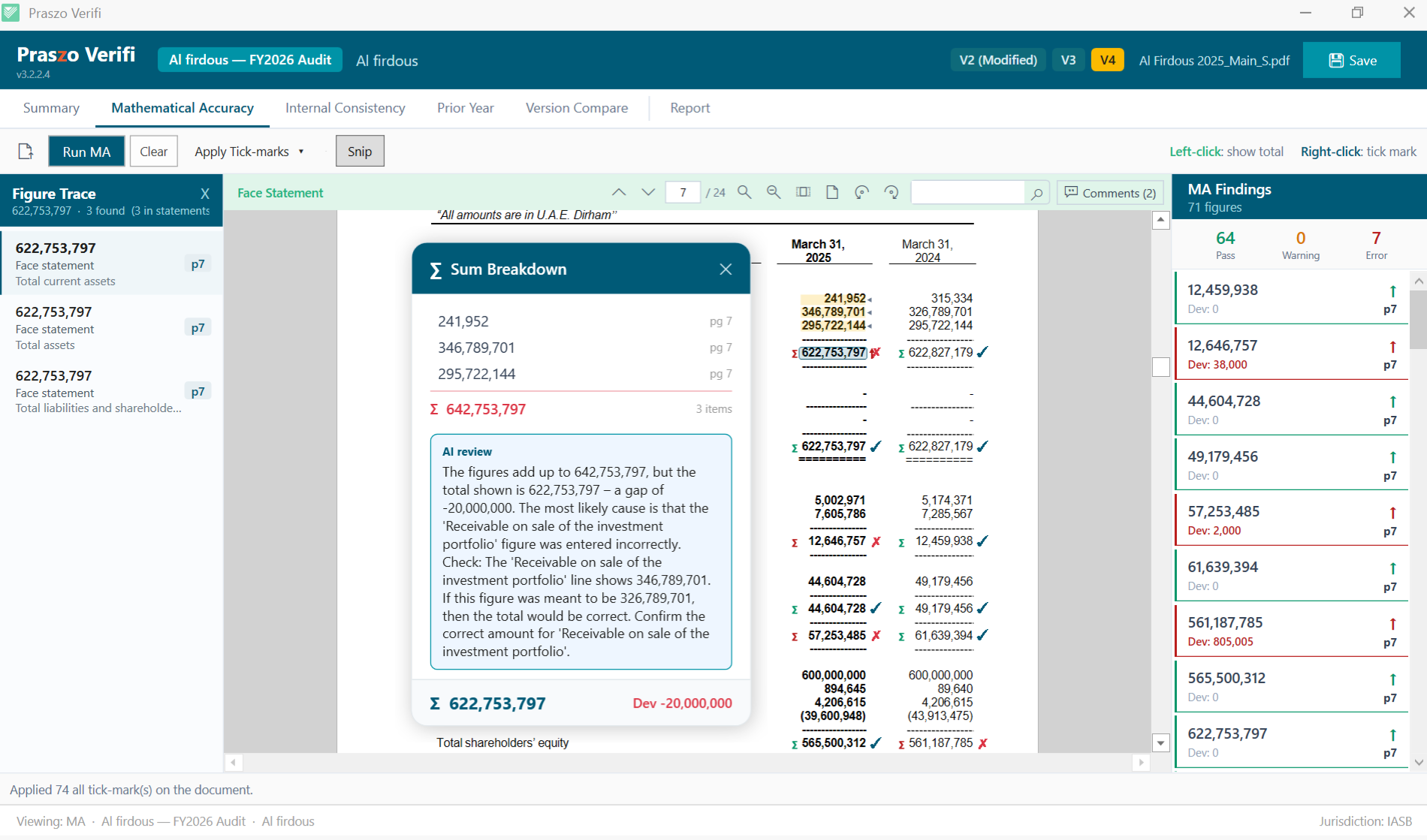
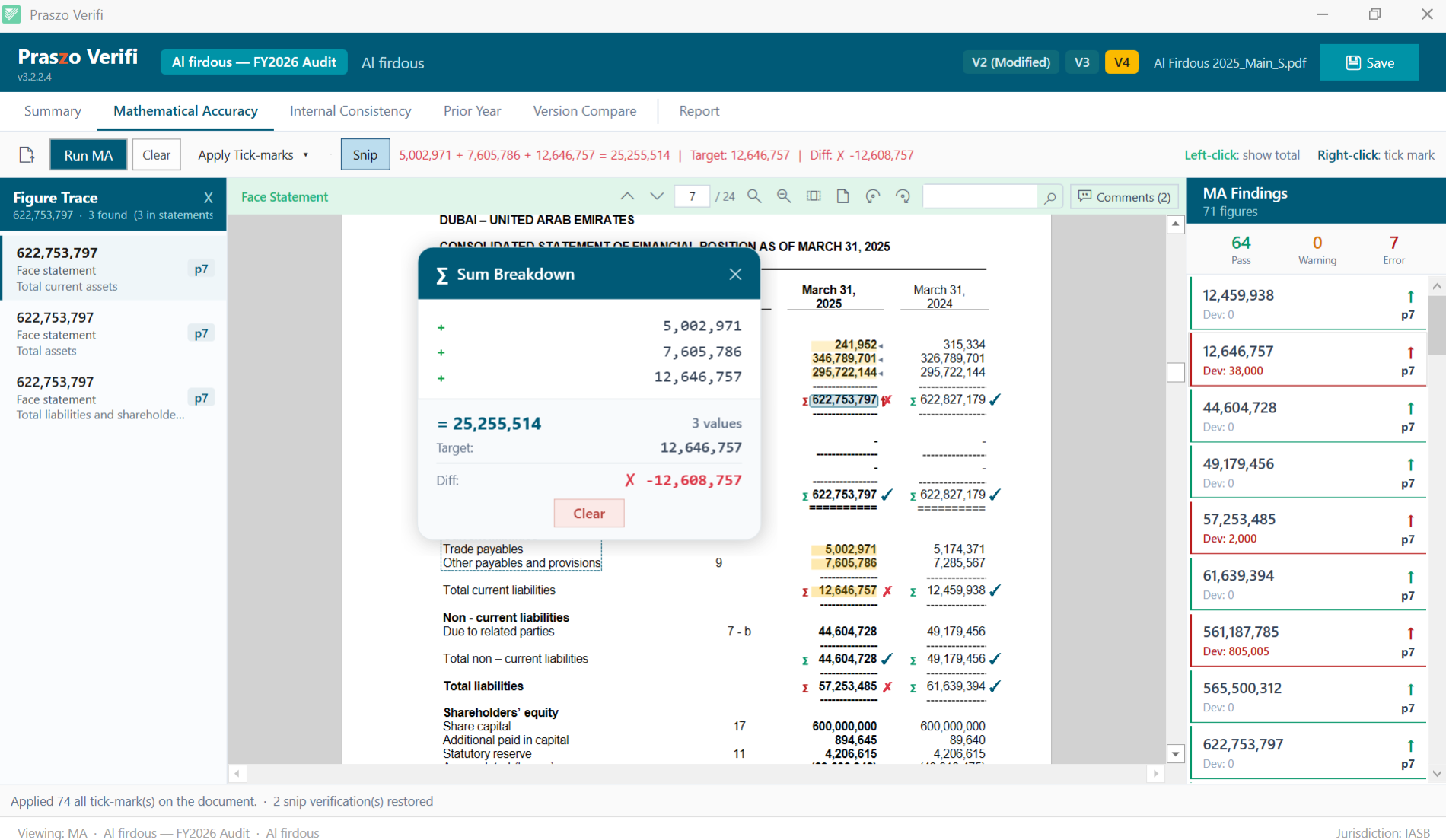
Casting and cross-casting. Every total is re-calculated, so broken subtotals and rounding never reach sign-off.
Every column, cross-cast movement schedule, subtotal deduction, and multi-page block re-calculated.
Hover any number to see its components in yellow and the total it feeds in green.
Click any Σ marker for additions, deductions, the exact deviation, and an AI-written explanation.
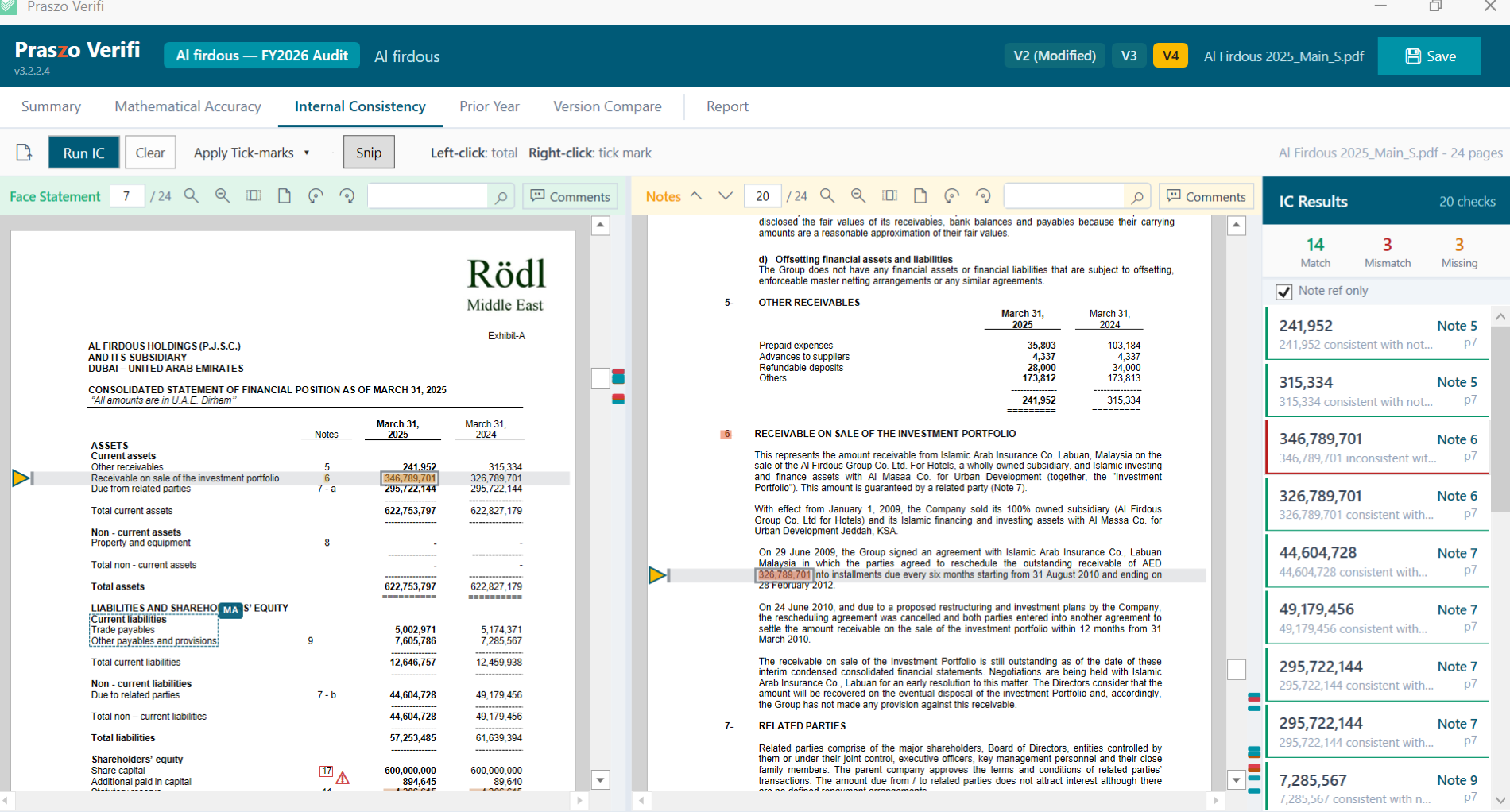
Internal consistency. The primary statements are tied to their disclosure notes.
Each line item is checked against its note table, such as PPE or retained earnings.
Single-digit transcription errors flagged as near-matches, and references to notes that don't exist caught.
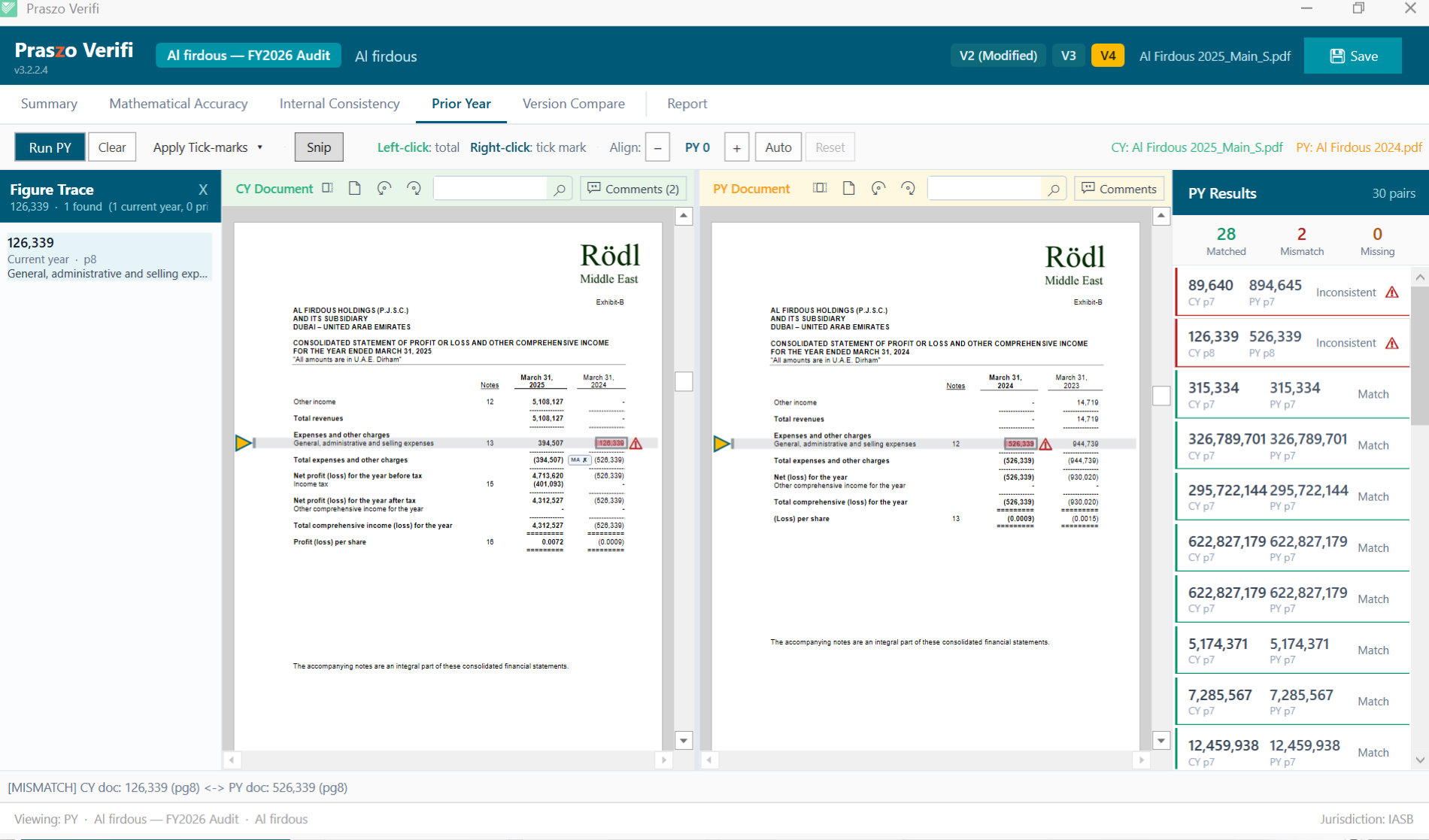
Comparatives. This year's comparative columns are checked against last year's signed report.
Comparative figures cross-checked against the finalized prior-year financial report.
Pages aligned side by side to spot unauthorized restatements or re-keying mistakes.
Delta tracking. See exactly what changed between two drafts.
Every line item addition, removal, or numerical edit highlighted in green and red.
Variance amounts and percentages, with changes acknowledged or ticked in bulk in one step.
The 4 core diagnostic engines
Verifi runs four verification checks across your whole draft to catch errors before they reach boards, clients, or regulators.
01
Casting and cross-casting. Every total is re-calculated, so broken subtotals and rounding never reach sign-off.
Every column, cross-cast movement schedule, subtotal deduction, and multi-page block re-calculated.
Hover any number to see its components in yellow and the total it feeds in green.
Click any Σ marker for additions, deductions, the exact deviation, and an AI-written explanation.
02
Internal consistency. The primary statements are tied to their disclosure notes.
Each line item is checked against its note table, such as PPE or retained earnings.
Single-digit transcription errors flagged as near-matches, and references to notes that don't exist caught.
03
Comparatives. This year's comparative columns are checked against last year's signed report.
Comparative figures cross-checked against the finalized prior-year financial report.
Pages aligned side by side to spot unauthorized restatements or re-keying mistakes.
04
Delta tracking. See exactly what changed between two drafts.
Every line item addition, removal, or numerical edit highlighted in green and red.
Variance amounts and percentages, with changes acknowledged or ticked in bulk in one step.
Reviewer workspace
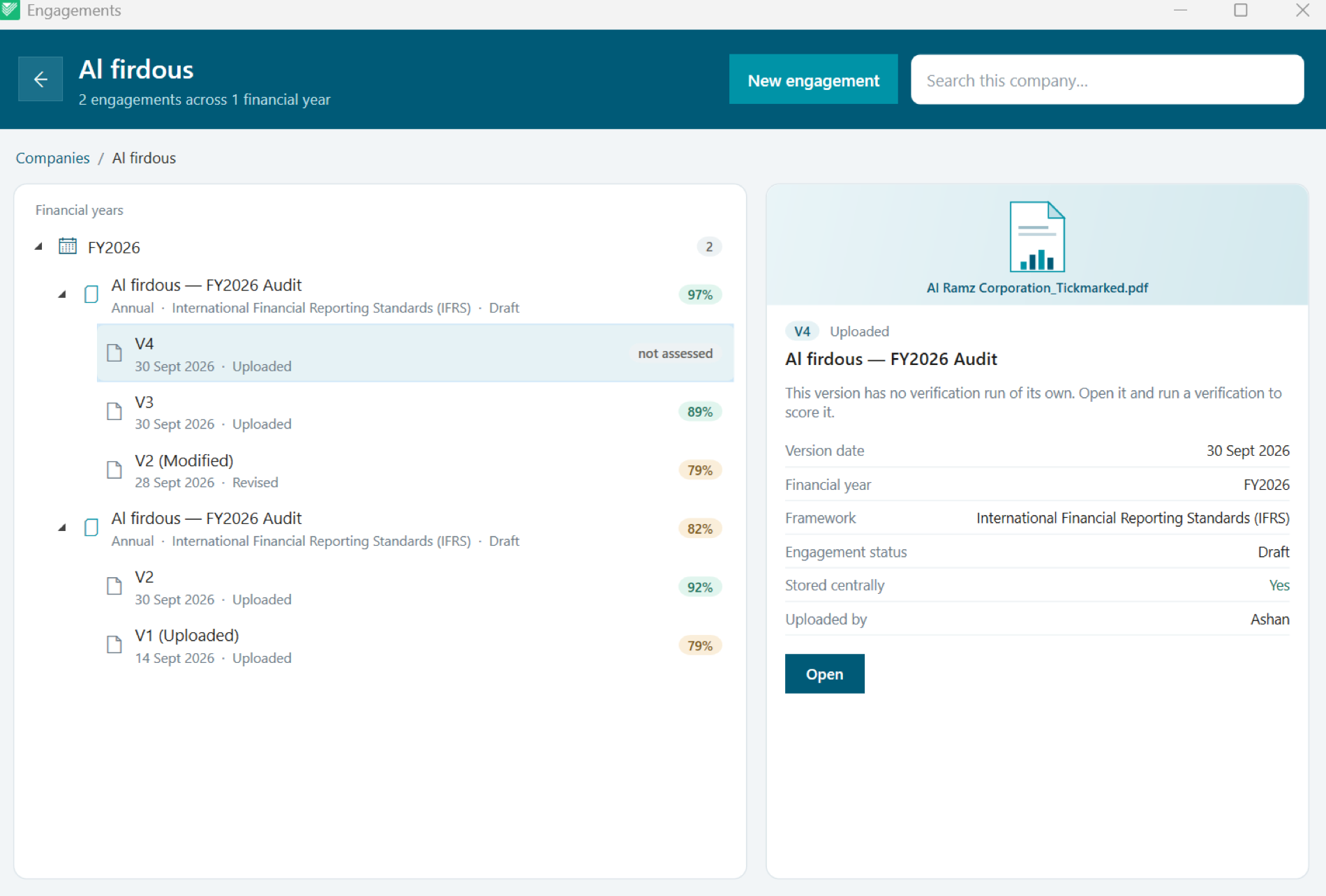
Interactive tools to inspect findings, mark up the draft, and document review work across the whole engagement.
Deliverables
When the review is complete, Verifi turns your team's work into clean, compliant audit deliverables.
Oversight
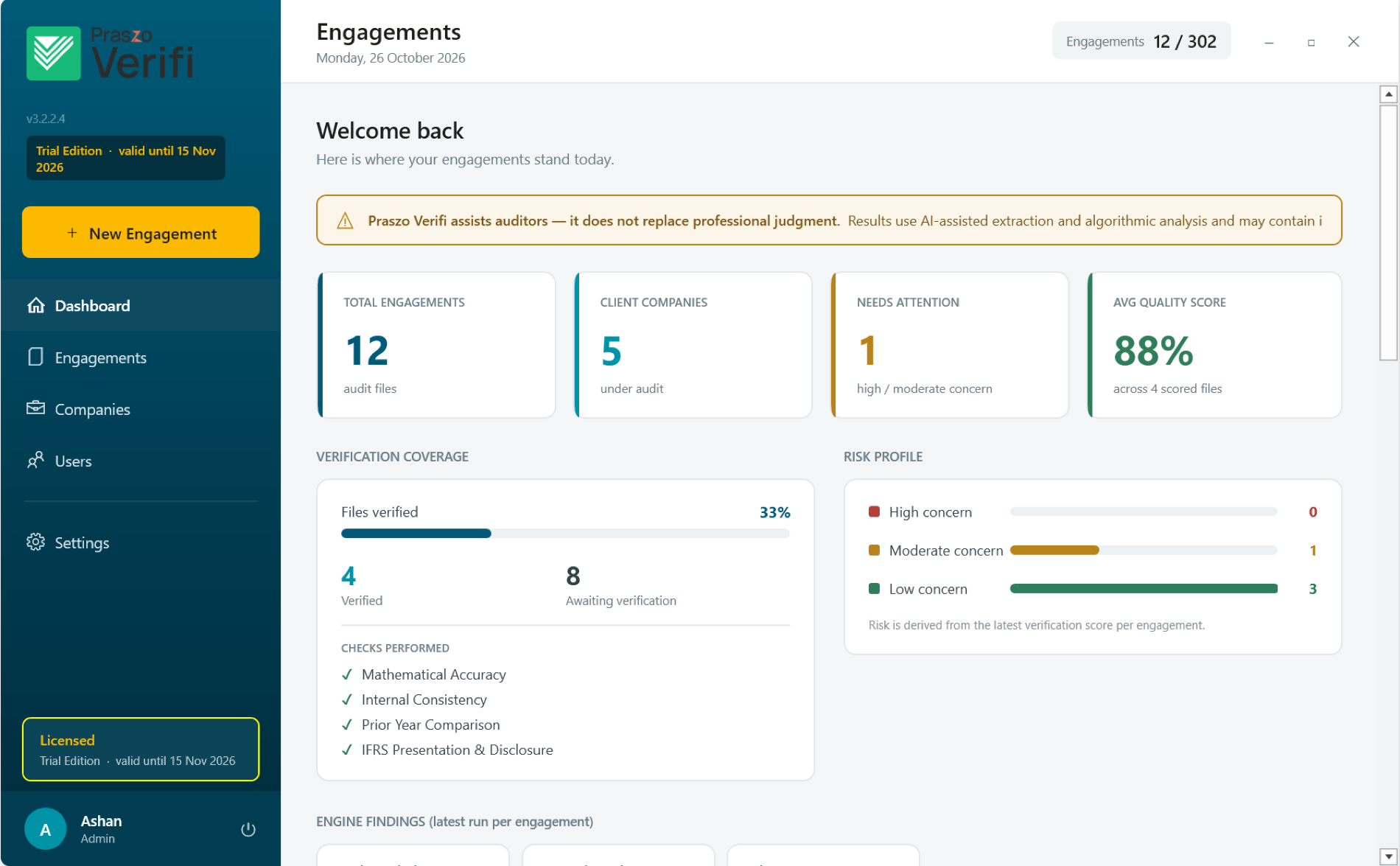
Statement health, open exceptions, material mismatches, and team workload on one dashboard, so partners see where each review stands.
Financial documents
AI validation report
PassBalance Sheet ↔ Notes
Cross-checked 42 line items. 100% match.
P&L recalculation
Totals recalculated. No discrepancies found.
Financial documents
AI validation report
PassBalance Sheet ↔ Notes
Cross-checked 42 line items. 100% match.
P&L recalculation
Totals recalculated. No discrepancies found.
Deliverables
When the review is complete, Verifi turns your team's work into clean, compliant audit deliverables.
Oversight
Statement health, open exceptions, material mismatches, and team workload on one dashboard, so partners see where each review stands.
How it works
Four engines, one review, and deliverables your engagement file can keep.
Annual, half-yearly, or quarterly; private, listed, or group; with your deviation tolerances.
Typed or scanned PDF and Word, read page by page, with sideways tables rotated.
Math, note reconciliation, prior-year tie-in, and draft revision compare across the whole document.
Trace figures, comment, tick, and accept, decline, or override each finding.
Tick-marked PDF, Excel working papers, and a customizable audit report.
Who it is for
01
No more calculator footings, page-flipping, or manual comparative tie-ins during busy season.
02
Catch calculation errors, mismatched note references, and restatement mistakes before final reports leave the firm.
FAQs
Verifi checks final financial statement drafts before sign-off. It reads every page, typed or scanned, and runs four automated checks: math, note reconciliation, prior-year tie-in, and draft revision compare.
Text-based or scanned PDF and Word documents. It rotates sideways tables automatically and supports both Western (1,234,567) and South Asian (12,34,567) number formats.
Verifi runs as a standalone desktop application on a single PC, or on a central firm database shared across your network server, so confidential client files stay behind your firewall.
No. Verifi flags potential errors and drafts explanations. Your team applies tick-marks, leaves comments, and logs formal approval overrides.
A tick-marked PDF with review comments as Acrobat sticky notes, Excel working papers with every check and reviewer decision, and a customizable PDF audit report.
Praszo Verifi
Bring mathematical precision and automated confidence to your audit workflow. See Praszo Verifi in a live demo.
Part of Praszo OS