
01
Automated 3-way reconciliation
Purchase invoices are matched against your audit sample, purchase orders (POs), and goods receipt notes (GRNs) in seconds.
Praszo Match
Turn hours of manual purchase checking into minutes of AI insights.
The problem
Purchase auditing is tedious, manual work. Spreadsheet comparisons, missing paperwork, and human error, with days spent matching invoice line items by hand
Interface
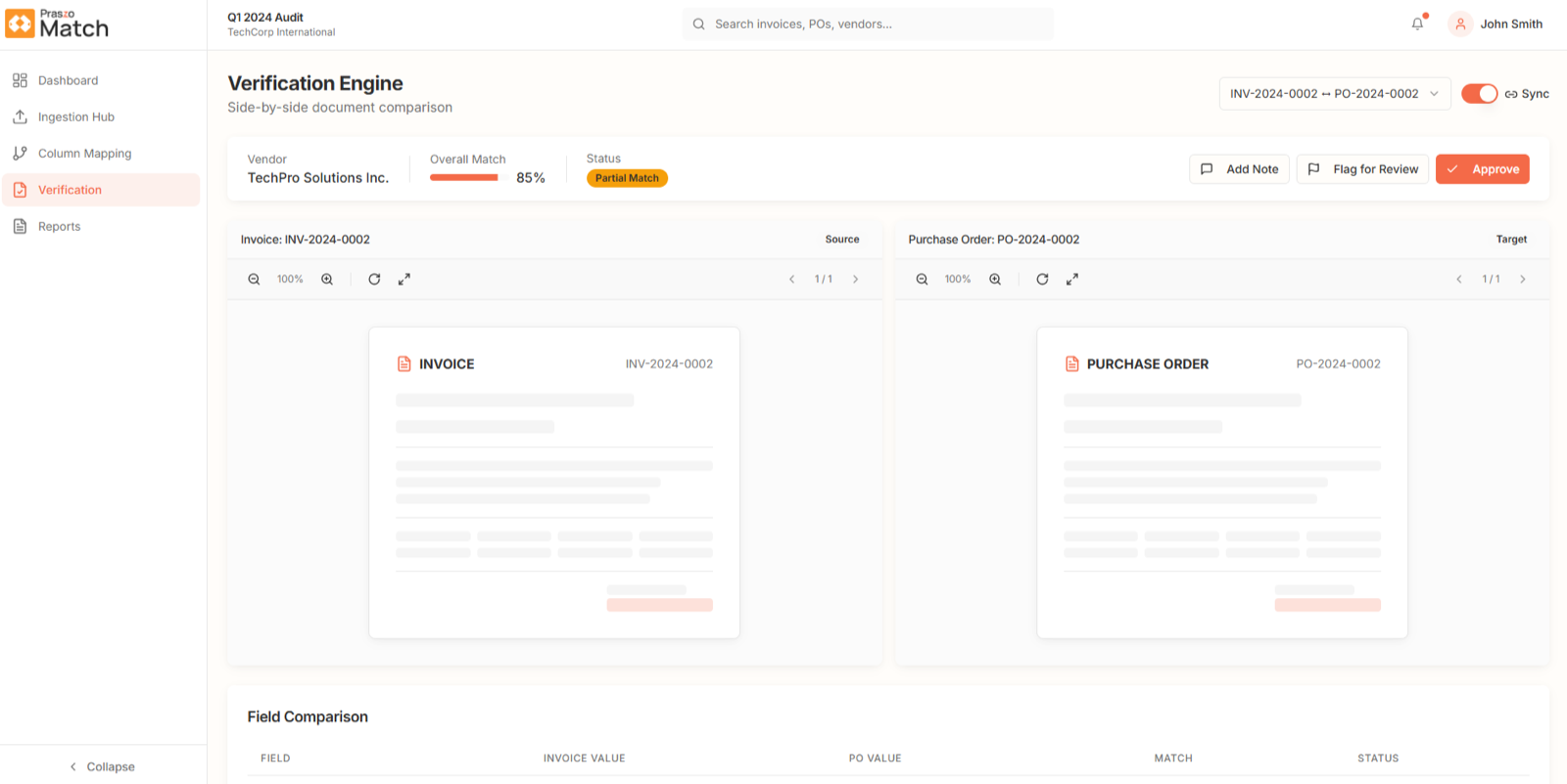
Invoice and purchase order side by side, with the overall match, status, and the auditor's note, flag, or approval.
01
Purchase invoices are matched against your audit sample, purchase orders (POs), and goods receipt notes (GRNs) in seconds.
02
Every review decision, auditor note, and override is logged with timestamped user details for senior sign-off.
03
Runs on a single auditor's laptop, or as a shared SQL database across the whole audit team.
04
A simple 4-step setup wizard gets your audit firm up and running in minutes.
Key verification modules
Deep line-by-line verification across three documentation levels: your purchase sample, the purchase order, and the goods receipt note.
Each invoice is paired with its row in your purchase sample.
Each invoice is matched to its corresponding row in the purchase sample.
Detects missing invoices, unrecorded sample entries, duplicate bookings, and amount variances.
Flags multi-currency transactions and highlights exchange discrepancies.
Line items are verified against approved purchase orders.
Line items checked against the approved PO to catch over-billing and price differences.
Flags risks such as purchase orders created after the invoice date.
Identifies un-invoiced open PO lines and partial billing.
Physical receipt of goods is confirmed before payment is verified.
Confirms that goods were physically received before payment verification.
Flags items billed before delivery, or invoiced but never received.
Distinguishes service charges from physical item deliveries automatically.
Key verification modules
Deep line-by-line verification across three documentation levels: your purchase sample, the purchase order, and the goods receipt note.
01
Each invoice is paired with its row in your purchase sample.
Each invoice is matched to its corresponding row in the purchase sample.
Detects missing invoices, unrecorded sample entries, duplicate bookings, and amount variances.
Flags multi-currency transactions and highlights exchange discrepancies.
02
Line items are verified against approved purchase orders.
Line items checked against the approved PO to catch over-billing and price differences.
Flags risks such as purchase orders created after the invoice date.
Identifies un-invoiced open PO lines and partial billing.
03
Physical receipt of goods is confirmed before payment is verified.
Confirms that goods were physically received before payment verification.
Flags items billed before delivery, or invoiced but never received.
Distinguishes service charges from physical item deliveries automatically.
Review interface
Match keeps auditor judgment at the center, and the dashboard shows where the risk is across every engagement.
Review
A split-screen view puts the source documents next to the match results. Click any sample entry to highlight the exact matched values on the invoice, PO, or GRN.
Reporting
When testing is complete, export professional audit reports in two formats.
Verification engine
INV-2024-0002 ↔ PO-2024-0002 ↔ GRN-2024-0002
| Field | Invoice | PO | GRN | Status |
|---|---|---|---|---|
| Vendor | TechPro Solutions Inc. | TechPro Solutions Inc. | TechPro Solutions Inc. | Match |
| Reference | INV-2024-0002 | PO-2024-0002 | GRN-2024-0002 | Match |
| Quantity | 120 | 120 | 120 | Match |
| Tax amount | 4,250.00 | 4,180.00 | — | Partial |
Tax difference within the defined threshold. Remark added for reviewer sign-off.
Review
A split-screen view puts the source documents next to the match results. Click any sample entry to highlight the exact matched values on the invoice, PO, or GRN.
Verification engine
INV-2024-0002 ↔ PO-2024-0002 ↔ GRN-2024-0002
| Field | Invoice | PO | GRN | Status |
|---|---|---|---|---|
| Vendor | TechPro Solutions Inc. | TechPro Solutions Inc. | TechPro Solutions Inc. | Match |
| Reference | INV-2024-0002 | PO-2024-0002 | GRN-2024-0002 | Match |
| Quantity | 120 | 120 | 120 | Match |
| Tax amount | 4,250.00 | 4,180.00 | — | Partial |
Tax difference within the defined threshold. Remark added for reviewer sign-off.
Reporting
When testing is complete, export professional audit reports in two formats.
How it works
Upload the sample once and let AI do the matching, while auditors keep the final say.
Drag and drop the purchase sample (Excel or CSV) with all supporting PDF vouchers. Multi-page bulk PDFs are read at once.
AI extracts key fields and pairs invoices with sample rows, POs, and GRNs, flagging line-item errors and missing records.
Auditors inspect discrepancies, confirm suggested matches, and record audit reasons.
Interactive workpaper folders and clean Excel audit schedules, ready for partner review.
Who it is for
01
Manage every audit client with trade license details, Tax Registration Numbers (TRN), and industry classifications.
02
Organize sample work by audit year, reporting currency, and engagement type: Audit, Review, Tax, or Advisory.
03
Admin, Auditor, Reviewer, and Viewer roles protect sensitive client data and restrict setting changes.
FAQs
Praszo Match is an intelligent audit tool for accounting and audit teams. It automates purchase testing by matching invoices against your purchase sample, purchase orders, and goods receipt notes.
Your purchase sample file (Excel or CSV) and the supporting PDF vouchers. No spreadsheet reformatting is needed, and multi-page bulk PDFs are read at once.
As a standalone desktop installation for a single auditor, or on a shared SQL database for larger audit teams.
It works with leading enterprise AI providers (Claude, Gemini, and GPT) and switches to a backup automatically to prevent downtime.
Yes. Auditors confirm or reject every suggested match, and accepting a discrepancy or re-linking a document requires a recorded reason.
Existing audit verifications stay fully accessible in read-only mode for review and workpaper inspection.
Praszo Match
Turn hours of manual checking into minutes of AI insights. See Praszo Match in a live demo.
Part of Praszo OS